Healthcare
Patient faq agent
Build Your Patient FAQ Agent with Mastra
Create a Mastra Patient FAQ Agent that answers general healthcare questions from your curated medical knowledge, then connect it to CometChat.Imagine an agent that answers common patient questions with concise, cited guidance—grounded in your medical content and available right inside chat.
What You’ll Build
- A Mastra agent specialized for healthcare FAQs (
patient-faq). - Retrieves answers from your
knowledge/<namespace>folder and cites sources. - Short, patient-friendly responses with medical disclaimers.
- Optional integration into CometChat chats.
Prerequisites
- Node.js installed
- Mastra framework
- OpenAI API key in
.envasOPENAI_API_KEY - A CometChat app (optional for chat integration)
Quick links
- Repo: patient-faq-agent
- Quickstart: Patient FAQ Agent Quickstart
- Swagger UI (local): http://localhost:4111/swagger-ui
- Knowledge folder: knowledge
- Local API base: http://localhost:4111/api
How it works
This project implements a retrieval-augmented Patient FAQ Agent that:- Ingests sources (URLs, files, or raw text) into a local knowledge folder per
namespaceusing the ingestSources tool. Normalized content is stored underknowledge/<namespace>. - Retrieves relevant snippets with the docsRetriever tool. It scans your
knowledge/<namespace>content, ranks results, and returns excerpts with file names as sources. - Generates answers using only retrieved context. The agent includes medical disclaimers and appends a concise “Sources” list.
- Handles errors defensively. Server utilities sanitize errors before returning responses.
Setup
1
Prepare project
Install dependencies and add
OPENAI_API_KEY in .env.2
Define the agent
The patient-faq agent answers from retrieved docs only, includes medical disclaimers, and cites sources. See src/mastra/agents/patient-faq-agent.ts.
3
Register in server
The server registers the agent and exposes
/api/tools/ingestSources and /api/tools/searchDocs. The agent chat endpoint is /api/agents/patient-faq/generate. See server entry.4
Ingest knowledge
Choose a
namespace (default: medical) and POST sources to /api/tools/ingestSources. Use URLs, file paths, or raw text.5
Ask the agent
Send chat turns to
/api/agents/patient-faq/generate with a messages array. Optionally pass toolParams.namespace to scope retrieval.6
Connect to CometChat
In Dashboard → AI Agents, set Provider=Mastra, Agent ID=
patient-faq, and point Deployment URL to your public generate endpoint.7
Deploy & observe
Make the API public, verify via Swagger UI, and re-run ingestion when docs change.
Project Structure
Core files and folders for the Patient FAQ Agent:- Environment & runtime
- Agent
- Tools
- Server
- Knowledge base (sample)
Step 1 - Create the Agent
src/mastra/agents/patient-faq-agent.ts
- Agent file: src/mastra/agents/patient-faq-agent.ts
- Docs retriever tool: src/mastra/tools/docs-retriever.ts
- Knowledge folder: knowledge/medical
- Set
nameto “patient-faq” so the API path is/api/agents/patient-faq/*. - Answer from retrieved docs only and include medical disclaimers.
- End every response with a short “Sources:” list.
- Register
docsRetriever.
Step 2 - Register the Agent in Mastra
src/mastra/index.ts
- Ensure the agent is registered with key “patient-faq” → API path
/api/agents/patient-faq/*. - Swagger UI is enabled via
server.build.swaggerUI=true.
Step 3 - Run the Agent
Expected local API base:http://localhost:4111/api
1
Install dependencies
npm install2
Start the dev server
npx mastra dev3
Ingest sources
POST to
/api/tools/ingestSources with a namespace (default: medical).4
Ask the agent
POST to
/api/agents/patient-faq/generate.- POST
/api/tools/ingestSources— ingest URLs/files/text intoknowledge/<namespace> - POST
/api/tools/searchDocs— retrieve relevant snippets fromknowledge/<namespace> - POST
/api/agents/patient-faq/generate— chat with the agent
Step 4 - Deploy the API
- Swagger UI (local)
- Ensure the public route:
/api/agents/patient-faq/generateis reachable.
Step 5 - Configure in CometChat
1
Open Dashboard
Open the CometChat Dashboard.
2
Navigate
Go to your App → AI Agents.
3
Add agent
Set Provider=Mastra, Agent ID=
patient-faq, Deployment URL=your public generate endpoint.4
(Optional) Enhancements
Add greeting, prompts, and configure actions/tools if you use frontend tools.
5
Enable
Save and ensure the agent toggle shows Enabled.
For more on CometChat AI Agents, see the docs: Overview · Instructions · Custom agents
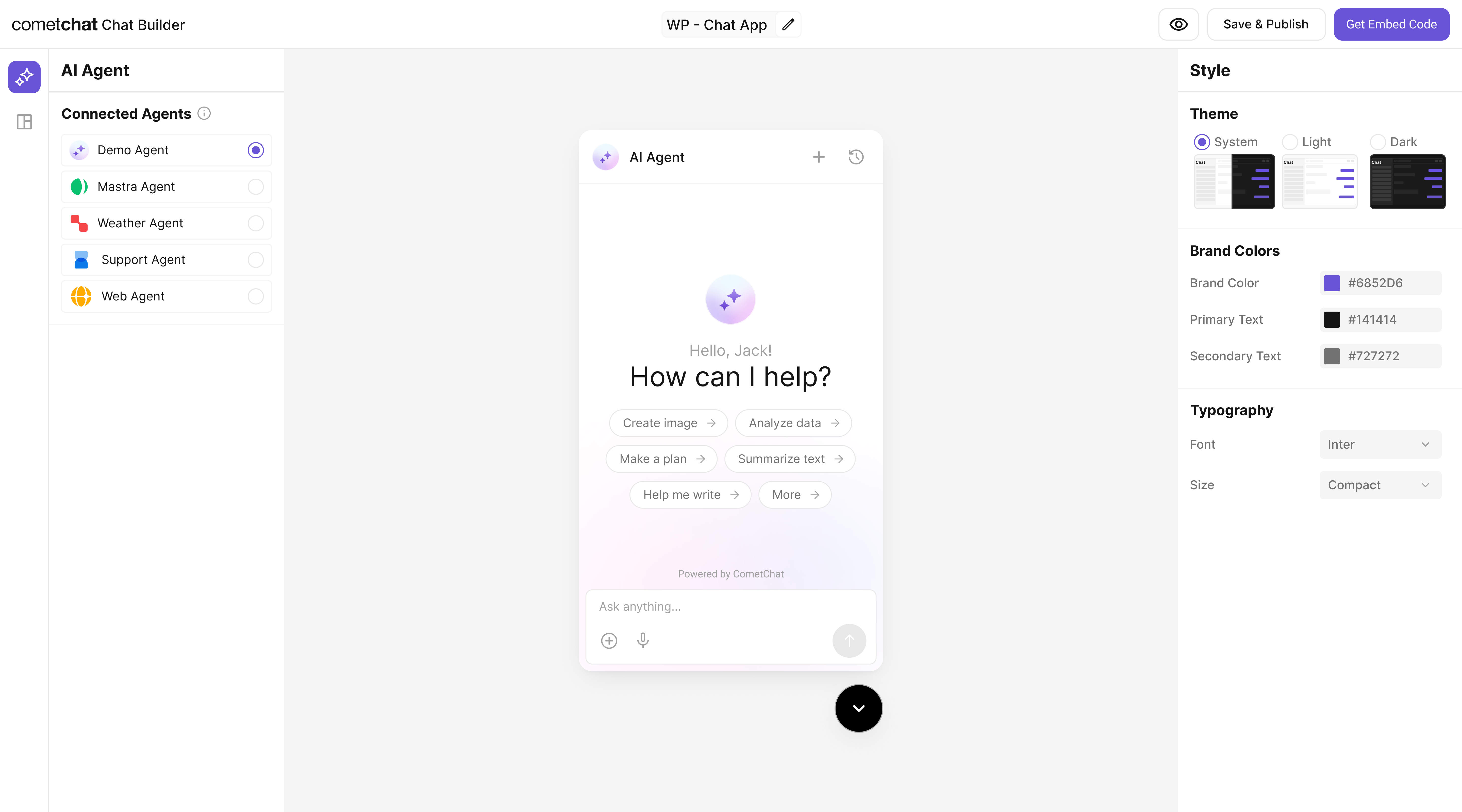
Step 6 - Customize in Chat Builder
1
Open variant
From AI Agents click the variant (or Get Started) to enter Chat Builder.
2
Customize & Deploy
Select Customize and Deploy.
3
Adjust settings
Theme, layout, features; ensure the Mastra Patient FAQ agent is attached.
4
Preview
Use live preview to validate responses & any tool triggers.
Step 7 - Integrate
Once your Patient FAQ Agent is configured, you can integrate it into your app using the CometChat No Code - Widget:

Note: The Mastra Patient FAQ agent you connected earlier is already part of the exported configuration, so your end-users can chat with that agent immediately.
Step 8 - Test Your Setup
1
API generates response
POST to
/api/agents/patient-faq/generate returns a doc-grounded answer with disclaimers.2
Agent listed
/api/agents includes “patient-faq”.3
Tool action works
UI handles
docsRetriever tool invocation.4
Full sample test (run curl)
See curl commands below.
Security & production checklist
- Protect endpoints with auth (API key/JWT) and restrict CORS to trusted origins.
- Add rate limiting and request size limits to ingestion and generate routes.
- Validate inputs: enforce allowed namespaces, URL/file whitelists, and payload schemas.
- Monitor logs and errors; sanitize responses using server utilities.
- Keep your OpenAI key server-side only; never expose it to the client.
Troubleshooting
- Agent talks too much: tighten instructions to answer concisely from docs and include disclaimers.
- No results: ensure
/knowledgecontains.md/.mdx/.txtfiles or your ingestion job populated the store. - Not visible in chat: verify the agent is added and enabled in CometChat.
- 404 / Agent not found: check that the server registers the agent with key
patient-faq. - PDF ingestion issues: install
pdf-parseif needed; useallowInsecureTLSonly in trusted environments.
Next Steps
- Add tools like
summarize-doc,triage-symptom, orlink-to-source. - Use embeddings + chunking for better retrieval.
- Restrict answers to whitelisted folders or domains.
- Inspect and try endpoints via Swagger UI (
/swagger-ui). - Set up CI/CD in your own repo as needed.